
Permits, Film Rights, Site Plan, Gear, Launch Checklist
You know that feeling when a big idea grabs you and won’t let go?
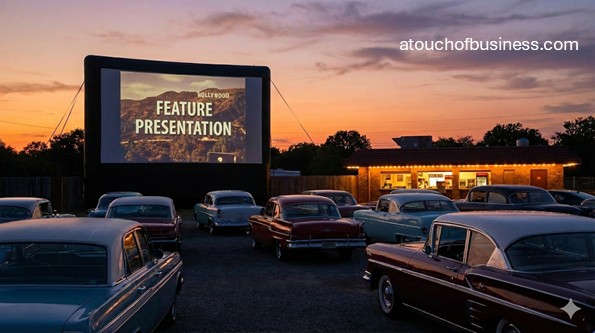
You can picture it clearly. A warm night. Headlights off. A giant screen lighting up a field full of cars.
A drive-in movie theater is a location-based entertainment venue where guests watch films from their vehicles on an outdoor screen. Your core launch job is to secure a compliant site, legal exhibition rights for films, and reliable projection and audio systems before you open to the public.
This is not a “set it up in a weekend” concept. The site, permits, and equipment drive most of the complexity.
Before You Commit, Do These Five Checks
Start here. Not with equipment. Not with land. With you.
Most first-time owners get into trouble because they rush past the personal decision and jump straight into spending.
1) Fit + ownership decision. Decide if owning and operating a business is for you, and then decide if this business is the right fit. Use this as a baseline: Points to Consider Before Starting Your Business.
2) Passion under pressure. Passion matters because problems will show up. When you care, you stay and solve. Without it, many people look for an exit instead of solutions. If you want a focused reminder, read why passion affects business success.
3) Motivation test. Ask yourself: “Are you moving toward something or running away from something?” If you are starting only to escape a job or a financial bind, that fuel may not last long enough to finish permitting, buildout, and launch.
4) Responsibility + readiness. Be honest about uncertain income, long hours, difficult tasks, fewer vacations, and full responsibility. Is your family or support system on board? Do you have (or can you learn) the skills, and can you secure funds to start and operate?
5) Learn from owners (non-competing only). Speak to owners in the same business only when they are not direct competitors. Only talk to owners you will not be competing against. That usually means a different city, region, or market.
Ask questions that reveal the real startup hurdles:
- “What approvals slowed you down the most, and which office should I speak with first in my area?”
- “What site issue did you miss during selection that you would screen for next time?”
- “Which equipment decisions were hardest to change later, and why?”
If you want a simple way to gather owner insight, use Business Inside Look as your framework and keep your questions practical.
Is This Large-Scale Or Small-Scale?
A drive-in movie theater is typically a large-scale startup. The land needs vehicle access, parking layout, lighting control, utilities, and safety planning. The screen, projection system, and audio system are specialized.
That scale affects almost everything: your budget, your legal structure, and whether you can do it alone. Many owners start with partners or outside funding because the site work and equipment can exceed what a typical first-time owner can cover with savings.
How Does A Drive-In Movie Theater Generate Revenue
Your revenue plan needs to be clear before you pick a site, because it affects space, permitting, staffing, and equipment.
Most drive-ins combine admissions with on-site sales and special events.
- Admission: Per vehicle or per person ticketing
- Concessions: Packaged snacks and drinks, and in some cases prepared foods (permits vary)
- Private rentals: Corporate nights, school events, community fundraisers (film rights still apply)
- On-screen ads and sponsorships: Pre-show or intermission spots (confirm any restrictions in your film and advertising agreements)
Typical Customers For A Drive-In
This is a convenience-driven venue. People do not want a long, stressful trip for a late-night show.
Your customer mix will shift by location, season, and programming.
- Families looking for a family-friendly night out
- Couples and friend groups looking for a social experience
- Teens and young adults in areas with limited nighttime entertainment
- Community groups and organizations booking private events
Pros And Cons To Weigh Before You Start
Keep this balanced. You are deciding whether the work is worth it for your life and your budget.
Write down what matters to you and compare it to what this startup demands.
Pros
- A drive-in uses vehicles as seating, which can reduce the need for indoor auditorium buildout.
- Large parcels can be adapted into entertainment use where indoor theater development may not make sense.
- Multiple revenue streams can be built into the site plan (admissions, concessions, rentals).
Cons
- Outdoor venues are sensitive to weather and site conditions.
- Permits and approvals can be layered across planning, building, fire, and health offices.
- Audio and film exhibition rights must be addressed before opening, and both have compliance requirements.
Essential Startup Equipment And Build Items
This is a planning list for startup and launch readiness. Your exact list will depend on your screen size, number of screens, parking capacity, and whether you sell food.
As you build your budget, get price estimates for major items and for the work required to install them. Scale and size drive your totals, so decide your capacity early.
Cinema Presentation (Projection And Playback)
- Digital cinema projector aligned to digital cinema system requirements (digital cinema specs are commonly referenced through Digital Cinema Initiatives guidance)
- Cinema server and playback control system
- Digital Cinema Package (DCP) storage and transfer hardware
- Projection booth or enclosure with temperature control
- Power conditioning and battery backup for critical systems
Screen System
- Screen structure and support system engineered to local code requirements
- Screen surface material and fastening system
- Maintenance access and safe service lighting (designed to avoid screen washout)
Audio Delivery (In-Car)
- Audio chain from playback system to transmission system
- FM transmission system configured to comply with FCC Part 15 requirements for unlicensed FM operation (including 47 CFR § 15.239 and related Part 15 technical limits)
- Antenna system, mounting hardware, and grounding protection
- Audio monitoring equipment to verify coverage within your lot
Site And Parking Field
- Entrance lanes, controlled entry points, and traffic control materials (cones, barricades)
- Parking row markers and directional signage
- Shielded site lighting designed for safety without harming screen visibility
- Accessible parking and accessible routes planned into the layout
Ticketing And Point Of Sale
- Ticket booth or gate system
- Point-of-sale (POS) hardware and payment processing setup
- Barcode or QR scanners if you sell online tickets
- Receipts, vehicle tags, or verification method for paid entry
Concessions (If Offered)
- Concession stand buildout or permitted mobile unit
- Refrigeration and food storage equipment
- Food warmers and holding equipment
- Handwashing and warewashing equipment as required by your local health authority
- Cooking equipment only if your permits allow it and your facility design supports it
Restrooms And Sanitation
- Permanent restrooms or permitted temporary restroom solutions (varies by jurisdiction)
- Trash receptacles and waste staging area
- Cleaning supplies and spill response supplies
Safety And Security
- Fire extinguishers and required fire safety equipment (final placement depends on fire inspection)
- Site lighting for pedestrian areas and emergency needs
- Security cameras and recording equipment for gates and public areas
- First aid supplies
Office And Admin Basics
- Computer, printer, and secure document storage
- Basic accounting and recordkeeping system (professional help is common here)
- Contract templates reviewed by a qualified attorney (leases, vendor agreements, event rentals)
Skills You Need Before Opening Day
You do not need to be an expert in everything. You do need to know what you must learn and what you should pay a pro to handle.
Drive-ins often require a mix of permitting, site planning, and technical know-how.
- Working with planning, building, fire, and health departments
- Basic budgeting and cash planning for a capital-heavy startup
- Vendor and contractor management (engineering, electrical, signage)
- Digital cinema workflow basics and equipment support planning
- Traffic flow and site safety planning for vehicles and pedestrians
If you want a simple way to build your support bench, this guide on building a team of professional advisors is a strong starting point.
Pre-Launch Work You Will Be Doing
Startup work is not glamorous. It is calls, documents, site visits, and approvals.
If that sounds draining, treat it as a signal before you invest.
- Reviewing zoning rules and site constraints with local offices
- Getting engineering input and contractor estimates
- Building a startup cost model and funding plan
- Setting up accounts, registrations, and insurance
- Ordering equipment and coordinating installation timelines
Red Flags To Watch For Early
Spot these early and you save yourself months of stress and a lot of wasted spend.
Most drive-in failures at startup come from site problems or approval problems, not from “marketing.”
- Zoning does not allow outdoor theater use, or approvals are uncertain with no clear path
- The site has drainage or floodplain issues that make a parking field unreliable
- There is no space for vehicle stacking on-site, which can cause traffic backup issues
- You cannot control nearby lighting that will wash out the screen
- Your audio plan depends on FM transmission, but you have not confirmed compliance requirements under FCC Part 15 (including 47 CFR § 15.239 and related Part 15 technical limits)
- You plan concessions but have not spoken to the local health authority about the permit path
Startup Steps
These steps are written for the United States and focus on pre-launch only. They follow a planning-to-opening sequence.
Move in order. A drive-in is a chain of dependencies, and skipping steps usually means rework.
Step 1: Define Your Concept And Capacity
Decide what you are building before you evaluate land. Choose single-screen or multi-screen, and decide whether admission is per vehicle or per person.
Your concept drives your site size, parking layout, restroom needs, concession scope, and staffing plan.
Step 2: Validate Demand And The Ability To Be Profitable
Demand is not a guess. Prove it with local research, not hope. Identify where people live, how far they will drive at night, and what entertainment options already exist.
Then test profit potential. Your plan must cover expenses and still pay you. If you cannot get the numbers to work on paper, the site will not fix it.
If you want a simple way to think about this, review how supply and demand affects a business and apply it to your local market.
Step 3: Confirm Film Exhibition Rights And Your Content Path
Showing a movie to the public requires permission from the copyright holder. That is part of federal copyright law, and it applies even if you play a film outdoors.
Before you invest in equipment, decide how you will secure films. You may work through a booking agent or directly with distributors, but either way you need a clear path to lawful public exhibition.
Step 4: Choose Your Ownership Model And Staffing Approach
Decide whether you are doing this solo, with partners, or with investors. This is often a capital-heavy startup, so many owners use partnerships or outside funding rather than relying only on personal savings.
Also decide how you will staff. You can do many early tasks yourself and hire later, but you will still need qualified help for design, construction, electrical work, and specialized cinema systems.
When you are ready to plan roles, this resource on how and when to hire can help you decide what to keep in-house versus contract out.
Step 5: Build Your Location Requirements List
Your location must support safe vehicle access, parking layout, screen placement, and utility needs. It also needs a realistic path to zoning and permitting approval.
Make your “must-have” list in writing. Include darkness control, safe entry and exit, space for vehicle stacking, and enough room for accessible routes and accessible parking.
Step 6: Shortlist Sites And Screen Them For Deal-Breakers
Do not fall in love with a site until you check the rules. Start with zoning and land use. Then check access points, drainage, nearby lighting, and any environmental constraints that could affect development.
If you need a practical guide to the decision, review this article on choosing a business location and apply it to a vehicle-based venue.
Step 7: Draft A Concept Site Plan And Technical Plan
Create a concept layout that shows screen placement, projection booth location, parking rows, traffic lanes, concessions, restrooms, lighting, and signage. You are not finalizing construction drawings yet. You are proving the concept can work.
At the same time, outline your cinema presentation plan. Digital cinema presentation is commonly aligned to industry specifications such as the Digital Cinema Initiatives Digital Cinema System Specification, and packaging standards are often discussed through SMPTE resources.
Step 8: Decide On Your Audio Method And Confirm Compliance
Many drive-ins deliver audio to car radios. If you plan to do that, confirm your compliance approach before you buy transmission equipment.
FCC Part 15 requirements for unlicensed FM operation include 47 CFR § 15.239 and related Part 15 technical limits. You should review the applicable rules and confirm how they apply to your planned setup. If your setup does not qualify, you may need a different approach.
Step 9: Build Your Startup Cost Plan Using Real Estimates
Now you price it out. Make a list of essential items and get estimates for equipment, site work, construction, utilities, and professional services.
Scale drives cost. A larger field, bigger screen, more parking, and more concessions space will change your totals fast. Use a structured method like estimating startup costs so you do not miss categories.
Step 10: Write A Business Plan Even If You Are Not Borrowing
A business plan is not only for lenders. It helps you make decisions with facts instead of stress.
It should cover your concept, market validation, site plan, approvals timeline, startup costs, funding plan, pricing approach, and launch plan. If you need a guide, start with how to write a business plan.
Step 11: Prepare Funding And Set Up Financial Accounts
Even if you have cash, separate your business finances early. Open accounts at a financial institution and set up your recordkeeping.
If you plan to borrow, prepare your package before you apply. Lenders typically want clear numbers, site control details, and a realistic approvals timeline. This overview of how to get a business loan can help you organize your next steps.
Step 12: Form Your Entity And Register For Taxes
Register your business with your state and set up your tax accounts before you open. Many small businesses start as sole proprietorships and later form a limited liability company as they grow, often for liability and structure benefits. That path exists, but a drive-in is often complex enough that many owners choose a formal entity early.
Apply for an Employer Identification Number through the Internal Revenue Service when you need it for banking, hiring, and tax accounts. Register for sales and use tax if your state requires it for admissions or food sales.
If you want a high-level walkthrough, use how to register a business and then verify details with your Secretary of State and state tax agency.
Step 13: Work Through Licenses, Permits, And Approvals In The Right Order
This is where patience matters. Most drive-ins need planning and zoning review, building permits for structures, inspections for fire safety, and health permits if you sell food.
Start by listing every approval you need and which office issues it. A practical starting point is the Small Business Administration overview on licenses and permits, then you confirm your local requirements with your city and county.
Varies By Jurisdiction
Rules change by state, county, and city. Do not guess. Verify locally and keep a written record of what each office tells you.
Use this checklist to confirm your path:
- Secretary of State: Confirm entity filing steps and name availability. Ask: “Do you require assumed name filings for my setup?”
- State tax agency: Confirm sales and use tax registration and whether admissions and food sales are taxable. Ask: “Do admissions have special tax rules in this state?”
- City or county planning department: Confirm zoning use and whether you need a special approval (such as a conditional use permit). Ask: “Is an outdoor theater allowed in this zoning district?”
- Building department: Confirm building permits and inspections for the screen structure, projection booth, concessions, and restrooms. Ask: “Will a Certificate of Occupancy (CO) be required before opening?”
- Fire marshal: Confirm fire access, extinguishers, and any cooking-related requirements. Ask: “What must be inspected before opening night?”
- Health department: If you sell food, confirm plan review and permitting requirements. Ask: “Do you allow packaged-only concessions without full cooking facilities?”
- State department of transportation or local public works: Confirm driveway permits and right-of-way rules if access connects to major roads. Ask: “Will traffic control improvements be required?”
Step 14: Address Accessibility Requirements Early In Site Design
A drive-in is a place open to the public, and accessibility requirements apply. Design decisions like accessible parking, accessible routes, and restroom access are easier and cheaper to do on paper than to fix later.
Use ADA.gov resources on Title III, accessible parking, and the 2010 Standards for Accessible Design as reference points while you work with your design team.
Step 15: Plan Food Service Compliance If You Will Sell Concessions
If you sell food, your local health authority will drive your requirements. Many jurisdictions use versions of the FDA Food Code, but adoption and enforcement details vary.
Start by identifying your food scope. Packaged-only is often simpler than cooking, but you still need to confirm the permit path with your local office.
Step 16: Address Stormwater Rules If You Will Disturb Land
If you are grading, clearing, or building a parking field, stormwater rules may apply. The Environmental Protection Agency explains that construction stormwater permits can be required when land disturbance meets certain thresholds, including one acre or more, or smaller sites that are part of a larger common plan.
Confirm whether your state runs its own program and which agency issues coverage before you start site work.
Step 17: Buy Long-Lead Equipment And Lock In Your Contractors
Once you have a realistic approvals timeline and site control, start ordering long-lead items like projection equipment, screen materials, and transmission components.
For installation work, use licensed professionals where required by law. Document warranties, service plans, and lead times so you can schedule buildout without gaps.
Step 18: Build Out The Site And Prepare For Final Inspections
Buildout includes site grading, utilities, structures, signage, lighting, and equipment installation. Your local building department will control inspections, and you may need a Certificate of Occupancy (CO) before opening public-facing structures.
Keep your inspection requirements list updated and schedule inspections early. Many delays happen because owners wait too long to request final inspections.
Step 19: Set Pricing And Confirm Your Supplier Relationships
Pricing is not just a number. It must support your costs and your market. Decide whether you charge per vehicle or per person, then test it against what your local market will accept.
Also select your suppliers early. That can include concession distributors, POS providers, equipment service vendors, and signage vendors. For pricing guidance, see pricing your products and services.
Step 20: Choose A Business Name And Secure Your Online Presence
Your name should be usable, available, and easy to remember. Confirm name availability with your state and then secure your domain and social handles.
If you want a structured approach, use this guide to selecting a business name and document your options before you commit.
Step 21: Build Basic Brand Identity Assets
You do not need a fancy brand package to open, but you do need clear, consistent basics. Start with a clean logo, simple signage, and customer-facing materials that match your tone.
For practical guidance, review corporate identity considerations, then add the essentials you truly need for launch, like what to know about business cards and business sign considerations.
Step 22: Set Up A Simple Website And Customer Info Flow
Your customers will look you up before they drive out at night. Your website should clearly show location, showtimes, rules, and how tickets work.
If you want a practical overview, use an overview of developing a business website and keep it simple and clear.
Step 23: Put Insurance In Place Before You Open
Insurance is part of launch readiness for a public venue. At minimum, plan for general liability. Also consider coverage for property and equipment, and any event-related requirements in your contracts.
If you have employees, workers’ compensation rules are state-based and may be required. Verify requirements with your state office using federal reference lists.
For a business-level overview, review business insurance basics and then confirm coverage details with a qualified insurance professional.
Step 24: Plan How You Will Get Customers To Show Up
This is a local venue. Your early marketing should be local and practical. Focus on visibility, clear information, and community partnerships that fit your concept.
If you need ideas tied to a location-based business, this guide on getting customers through the door is a strong place to start.
Step 25: Plan Your Grand Opening And A Controlled First Night
A grand opening is not just noise. It is your first proof that your systems, site, and customer flow work. Plan a controlled soft opening first, then your opening weekend.
If you want structured ideas, use ideas for your grand opening and adapt them to your local market and your permits.
Pre-Opening Checklist
This is your last-pass list before you open to the public. Keep it short and specific.
Do not skip the compliance items. Opening without approvals can create expensive consequences.
- Final compliance checks: Confirm all required approvals are issued and final inspections are complete, including any Certificate of Occupancy (CO) requirements.
- Essentials and gear check: Test projection, playback, and audio coverage; verify power stability; confirm signage and traffic controls are ready.
- Payment readiness: Confirm your POS works end-to-end and you can accept payment in person and online if offered.
- Customer information: Confirm your website is live, accurate, and easy to read from a phone.
- Marketing kickoff: Publish opening details and confirm your launch communications are scheduled.
Quick Recap And Next Moves
A drive-in movie theater startup is built on four pillars: a compliant site, lawful film exhibition rights, reliable cinema systems, and a clean approvals path.
If you are missing any one of those, slow down and fix it before you spend more.
If you want a steady grounding before you choose a direction, revisit Points to Consider Before Starting Your Business, reinforce your mindset with the role of passion under pressure, and keep using Business Inside Look to learn from owners you will not be competing against.
Is This The Right Fit For You?
This business can fit you if you like planning, permits, and building real-world systems that people use in a shared space.
It may not fit you if you want a quick launch, low upfront costs, or a business you can run entirely alone.
Ask yourself three simple questions. Are you willing to secure a site and navigate approvals? Can you fund both buildout and launch? And do you still want it after you picture the slow parts, not just opening night?
101 Real-World Tips for Your Drive-In Movie Theater
Here you’ll find practical tips to help you think clearly and take smart action as you build and run your drive-in.
Pick the ideas that fit your situation and ignore the rest for now.
Save this page so you can come back when a new problem shows up.
Try one tip, give it time, and then return for another.
What to Do Before Starting
1. Write a simple concept statement: what you show, who you serve, and how you handle audio and parking. If you can’t explain it in plain words, the plan is not ready.
2. Confirm you can legally exhibit films before you buy major equipment. Public performance rights are not optional, and the time to learn that is before you announce your first lineup.
3. Decide whether you charge per vehicle or per person early. That decision changes your entry flow, ticket checks, pricing math, and staffing needs.
4. Build a site requirements list before you tour properties. Include light control, safe entrances and exits, room for vehicle stacking, and space for accessible parking and routes.
5. Call the local planning office before you sign anything. Ask whether an outdoor theater use is allowed, whether a special approval is required, and what the typical timeline looks like.
6. Do a nighttime site visit. What looks fine at noon can be washed out at dusk by nearby signage, streetlights, or sports fields.
7. Sketch a basic site layout on paper before paying for drawings. Mark the screen, parking rows, entry lanes, exit lanes, restrooms, concessions, and pedestrian paths to spot problems early.
8. Treat stormwater and drainage as a first-round filter. If the parking field turns to mud or standing water, you will lose nights and damage your reputation.
9. If you plan grading or land disturbance, learn the construction stormwater rules in your state. Federal guidance explains when construction activity may require permit coverage, and states can run their own programs.
10. Choose your audio approach and confirm compliance before you buy radio equipment. If you plan to transmit audio by FM, review the federal rules for unlicensed operation and confirm how they apply to your setup.
11. Plan accessibility from the start instead of “fixing it later.” Work from ADA public accommodation guidance and design standards while your layout is still flexible.
12. Decide your food plan early because it drives permits and building design. Packaged-only sales may be simpler than cooking, but the local health authority decides what is allowed.
13. Build a startup budget from quotes, not guesses. Separate site work, structures, projection and audio, utilities, restrooms, concessions, and professional services so you can see what is driving the total.
14. Write a business plan even if you are self-funding. It forces you to test demand, estimate true costs, and think through the timeline without pressure.
15. Choose a legal structure based on risk and scale, not convenience. Many small businesses begin as sole proprietorships and later form a limited liability company as they grow, but a venue with guests on-site often needs stronger structure earlier.
16. Get an Employer Identification Number when you need it for banking, hiring, and tax accounts. Do it directly through the Internal Revenue Service and keep the confirmation in a secure file.
17. Create a permit and inspection tracker as soon as you pick a site. Include the office name, the approval type, the order you must follow, and the dates you contacted them.
What to Know About the Industry (Rules, Seasons, Supply, Risks)
18. Film exhibition rights are a core business dependency, not a detail. Make a written plan for how you will secure titles, terms, and delivery formats.
19. Digital cinema is a standards-driven world. Use the Digital Cinema Initiatives system specification as a reference point when you evaluate projection and playback expectations.
20. Learn what a Digital Cinema Package is and how it is delivered and ingested. SMPTE resources can help you understand the packaging and format side so you ask better questions of vendors.
21. Outdoor presentation adds risk you don’t face indoors. Wind, rain, dust, and temperature swings can affect screen systems and projection spaces, so build protection into your design choices.
22. Light pollution is a business risk you can’t ignore. If you can’t control or out-distance competing light sources, your picture quality and customer satisfaction will suffer.
23. Entry and exit traffic can become a community issue fast. Plan on-site vehicle stacking so you don’t push lines onto public roads and trigger complaints.
24. If you use FM audio, compliance matters as much as clarity. Review the federal rule for unlicensed FM operation and confirm your technical limits so you don’t build around an approach you can’t legally use.
25. Food service rules are mostly local and can change by county. Use federal resources to find your state retail food code references, then verify directly with your local health authority.
26. Accessibility requirements apply to public venues. Treat accessible parking, routes, and restrooms as non-negotiable design items, not optional upgrades.
27. A drive-in is seasonal in many markets, even if you aim for year-round shows. Model your cash needs with a conservative assumption about how many nights you can realistically operate.
28. Your timeline can be dominated by approvals, not construction. Plan your launch date only after you understand zoning steps, permit review cycles, and inspection scheduling in your area.
What Successful Drive-In Movie Theater Owners Do
29. They decide the customer flow before they design the site. Entry lanes, parking direction, and exit routing are planned as carefully as the screen location.
30. They run a full “site walk” checklist before each show night. It includes lighting checks, lane markers, trash readiness, restroom readiness, and safety equipment placement.
31. They test the picture and audio the same way every time. Consistency turns technical checks into a quick routine instead of a last-minute scramble.
32. They keep written procedures for the critical moments. Gate opening, traffic control, refund decisions, and emergency response are not left to guesswork.
33. They plan backups for the systems that stop the show. A spare cable, a backup audio path, and a way to communicate to guests can save a night.
34. They keep vendor contacts organized and current. Projection support, electrical support, and food equipment support are easier when you can reach the right person fast.
35. They build relationships with local offices early. A respectful, organized owner tends to get clearer answers and smoother inspection days.
36. They track complaints and patterns, not just isolated incidents. If the same issue repeats, it becomes a process fix, not a one-time apology.
37. They protect the brand by being clear and fair. Simple rules, posted early, reduce conflict and help staff stay calm.
Running the Business (Operations, Staffing, Written Procedures)
38. Assign one person as “show lead” each night. That person owns the timeline, the final checks, and the go/no-go call when something is off.
39. Train gate staff to solve common problems without escalation. Give them clear rules for late arrivals, vehicle counts, and ticket verification.
40. Create a standard approach for parking direction. Use consistent lane markers and hand signals so drivers aren’t guessing in the dark.
41. Separate pedestrian paths from vehicle lanes where possible. People will walk to restrooms and concessions, and the layout should protect them.
42. Use shielded lighting and place it with purpose. The goal is safe movement without washing out the screen area.
43. If you sell food, build a simple food safety routine into opening and closing. Temperatures, handwashing access, and cleaning tasks should be assigned and verified.
44. Use a checkout system you can operate reliably in your environment. Outdoor conditions and weak connectivity can break “fancy” setups, so test it on-site at peak load.
45. Set up a clear cash-handling routine even if most people pay by card. Your staff needs a simple rule for where money is kept, who counts it, and when it is secured.
46. Create a written policy for disruptive behavior. Spell out what triggers removal and who makes the decision so staff don’t argue with guests.
47. Build a cleanup plan into the last half-hour of the night. If you wait until the end, you will go home later and do a worse job.
48. Keep a maintenance log for screen systems, projection space, and audio systems. Small issues are easier to fix when you catch them early.
49. Track your “show stoppage” risks and reduce them one by one. Power stability, heat control, and weather protection are common problem areas.
50. Use clear radio instructions for guests if your audio is FM-based. Post the station information at entry and repeat it in multiple spots to reduce confusion.
51. Plan staffing around peak moments, not average moments. Entry rush, intermission, and exit are where you need extra hands.
52. Write a one-page nightly checklist for staff, but keep it practical. If it takes too long to use, it won’t get used when it matters.
Marketing (Local, Digital, Offers, Community)
53. Treat your signage as your first marketing channel. Clear entrance signs and show-night instructions reduce frustration and improve word-of-mouth.
54. Keep your website simple and fast. Show location, showtimes, pricing, rules, and how to hear the audio, without forcing people to hunt.
55. Claim and maintain your local business listings. Consistent hours, address, and contact information prevent people from showing up at the wrong time.
56. Use “first visit” messaging that explains what to expect. New guests need basics: arrival time, parking behavior, audio method, and weather policy.
57. Build partnerships with local schools, youth groups, and nonprofits. Private nights and fundraisers can fill your schedule and anchor you in the community.
58. Create a simple referral offer that is easy to explain and easy to track. If staff can’t describe it in one sentence, it is too complex.
59. Use email and text lists carefully and only with permission. A short weekly update can outperform constant posting when your business is seasonal.
60. Plan content around the experience, not just the film title. Photos of the setup, rules explained clearly, and behind-the-scenes checks build trust.
61. Promote your rain policy and show policy early, not after a problem. Clear expectations reduce refunds and angry reviews.
62. Use local press the right way by making it easy to cover you. Provide clean details: what makes the venue different, opening date, and how first-timers should prepare.
63. Price promotions carefully so you don’t train people to wait for discounts. Use offers to fill slow nights, not to reduce the value of peak nights.
64. Ask for reviews at a calm moment, not while guests are driving out. A simple follow-up message after the show is better than a rushed request at the gate.
Dealing with Customers (Trust, Education, Retention)
65. Post your “how it works” rules where people will see them before they arrive. That includes arrival time, audio instructions, and vehicle behavior expectations.
66. Explain battery and radio expectations without scaring people. Remind guests to keep an eye on their battery and plan for their audio method.
67. Use clear guidance for large vehicles. If trucks and sport utility vehicles block sightlines, set rules for where they park so small cars aren’t punished.
68. Set expectations for late arrivals. Decide whether you allow them, where they enter, and how you park them without disrupting others.
69. Teach the rules with calm, consistent language. If staff sound annoyed, guests will push back harder.
70. Offer simple options for guests who want more comfort. Even small steps like selling low-cost seat mats or offering designated walk-in areas can improve satisfaction, if your layout supports it.
71. Make it easy for guests to contact you with a real question. A single contact method that you actually monitor reduces review-site complaints.
72. Use clear child safety expectations. Vehicles moving in the dark and children walking around is a risk you must actively manage with rules and reminders.
73. Treat repeat guests like regulars. A simple “welcome back” message and a loyalty approach that is easy to run can increase retention.
Customer Service (Policies, Guarantees, Feedback)
74. Write your refund policy in plain language and follow it consistently. If people feel surprised, they will not be generous in reviews.
75. Create a rain plan that is fair and simple. Options like rescheduling or a credit for another night can prevent arguments, but local rules and payment processor limits may affect what you can do.
76. Decide how you handle technical failures before they happen. If the show stops, guests want to know the plan within minutes, not after a long silence.
77. Build a complaint pathway that protects staff. If a guest is upset, staff need a clear escalation step and a manager decision point.
78. Use a consistent approach for lost tickets or entry disputes. A written rule prevents staff from making “emotional decisions” under pressure.
79. Ask for feedback with one focused question at a time. You’ll get more usable answers if you ask about a single issue like entry flow or audio clarity.
80. Track the top five customer complaints monthly and attack them. Fixes like better signage, clearer rules, and adjusted staffing can eliminate repeat issues.
81. Keep your public responses short and professional. A calm reply that states the policy and offers a next step protects your reputation.
Sustainability (Waste, Sourcing, Long-Term)
82. Reduce trash by choosing packaging that is easy to dispose of and collect. Lids, bins, and clear signage can prevent a parking field from becoming a cleanup disaster.
83. Place trash and recycling at natural “pause points.” Restrooms, concessions, and exits are where people will actually use them.
84. Use lighting that balances safety and energy use. Shielded, well-placed fixtures can reduce wasted light and reduce the chance of screen washout.
85. If you run generators for any part of the site, plan fuel storage and safety carefully. Storage rules can vary by state and locality, so verify requirements before you set a routine.
86. Create a plan for cleaning chemicals and disposal. Keep products labeled, stored safely, and used according to instructions.
87. If you sell food, reduce waste with tight ordering and clear inventory checks. Throwing away food is a cost and a compliance risk if storage practices slip.
Staying Informed (Trends, Sources, Cadence)
88. Keep a short list of “must-check” sources for rules: your city or county planning office, building department, fire marshal, and health authority if you sell food. Write down names and numbers so you don’t start from zero each season.
89. Review federal guidance once a year for areas that affect you directly. For many drive-ins, that includes accessibility guidance, audio transmission rules if you use FM, and construction stormwater rules if you expand the site.
90. Track changes in film delivery expectations and equipment support. Digital cinema standards and practices can shift, and you do not want to learn that after a system failure.
91. Keep a maintenance calendar that matches your season. Outdoor equipment and grounds care benefit from scheduled checks, not last-minute repairs.
92. Talk to a few non-competing owners each year. Ask what surprised them recently and what they changed so you can learn without paying the full price of discovery.
Adapting to Change (Seasonality, Shocks, Competition, Tech)
93. Build a “bad week” plan into your cash planning. Weather and cancellations can cluster, and you need a way to cover fixed costs when the gate is quiet.
94. When competition shows up, do not race to the bottom on price. Improve clarity, flow, and the experience first because those are harder for others to copy.
95. Plan technology upgrades as projects, not emergencies. When you budget for improvements, you avoid panic buying and rushed installs.
96. If you expand capacity, re-check approvals and site impacts. Parking changes, lighting changes, and food changes can trigger new reviews depending on local rules.
What Not to Do
97. Don’t sign a lease before you confirm zoning and the approval path. A “great deal” is not great if you can’t legally operate there.
98. Don’t assume you can “figure out film rights later.” Make lawful exhibition part of your startup checklist because it can block your launch.
99. Don’t buy audio transmission equipment without confirming the rules that apply to your plan. If your setup is not compliant, you may be forced to change direction after spending money.
100. Don’t ignore accessibility until the end. Late changes to parking, paths, and restrooms are often more expensive and more stressful.
101. Don’t rely on memory for critical steps. Write procedures and checklists so staff can deliver the same experience every night.
A drive-in can be a rewarding business, but it rewards preparation more than optimism.
Keep your focus on what blocks opening night: site approval, lawful film exhibition, safe traffic flow, and reliable presentation systems.
If you take the time to build those foundations, the rest gets simpler to manage.
FAQs
Question: What are the first legal steps to start a drive-in movie theater?
Answer: Choose a business structure, register the business with your state, and get your tax registrations in place before you open. Get an Employer Identification Number if you need it for banking, hiring, or tax accounts.
Question: How do I figure out what licenses and permits I need?
Answer: Start with your city or county planning, building, and fire offices, then add the health department if you sell food. Use the Small Business Administration as a checklist starter, then verify the exact requirements locally.
Question: How do I check if zoning allows a drive-in movie theater on a specific property?
Answer: Ask the planning or zoning office for the permitted use table for that parcel’s zoning district. Confirm whether the use is allowed by right or needs a special approval and what the application steps are.
Question: Do I need a Certificate of Occupancy before opening?
Answer: Many jurisdictions require a Certificate of Occupancy for new construction or a change of use. Ask the building department what triggers it for your site and what inspections must be passed first.
Question: What is the legal way to show movies at a drive-in?
Answer: You need public performance rights to exhibit films to the public. Confirm your path to lawful exhibition before you advertise titles or sell tickets.
Question: What equipment basics should I plan for on the cinema side?
Answer: Plan for a digital cinema projector, a playback server, and a secure way to ingest and store movie files. Use Digital Cinema Initiatives guidance and SMPTE digital cinema resources to ask better questions when you compare vendors.
Question: What is a Digital Cinema Package and why does it matter?
Answer: A Digital Cinema Package is a standardized way films are delivered for digital cinema playback. Your equipment and workflow must match what your content provider delivers, so confirm formats early.
Question: Can I use an FM transmitter for in-car audio?
Answer: Many drive-ins use FM audio, but you must follow Federal Communications Commission rules for your setup.
Review FCC Part 15 requirements (including 47 CFR § 15.239 and related Part 15 technical limits) and confirm whether your plan qualifies for unlicensed operation.
Question: What accessibility requirements should I plan for at the site?
Answer: A drive-in is a public-facing venue, so accessibility rules apply to features like parking, routes, and facilities. Use ADA Title III guidance and the 2010 design standards while you design the layout.
Question: If I sell snacks or food, what approvals are involved?
Answer: Food rules are usually enforced by your local health authority and can differ by county and state.
Use the Food and Drug Administration’s state retail food code links to find your state references, then confirm the local permit path.
Question: Do I need a construction stormwater permit for grading and building a parking field?
Answer: Stormwater permitting can apply to construction activity depending on how much land is disturbed and who the permitting authority is in your area.
Use Environmental Protection Agency guidance to identify the program, then confirm requirements with your state agency or the Environmental Protection Agency where applicable.
Question: How should I choose between going solo, adding partners, or bringing in investors?
Answer: Tie the decision to startup scale, risk, and capital needs. If the site, structures, and cinema systems exceed what you can fund and manage alone, partners or investors may be more realistic.
Question: What insurance should I carry before I open?
Answer: General liability is a core starting point for a venue where guests drive and walk on-site. Many owners also add property and equipment coverage, and some contracts require specific limits and added insured wording.
Question: How do I set owner-side pricing without guessing?
Answer: Build pricing from your cost structure and your local demand, then test whether it covers expenses and pays you. Decide early whether you charge per vehicle or per person, because that changes your revenue math and gate workflow.
Question: What are the most important workflows to standardize once I’m operating?
Answer: Standardize gate entry, parking direction, show start checks, and end-of-night cleanup so staff can repeat the same steps every time. Written checklists reduce mistakes on dark, busy nights.
Question: How do I staff the gate and parking safely on busy nights?
Answer: Staff your peak moments, not your average moments, because entry and exit are where issues pile up. Assign a clear lead who controls lane setup, parking direction, and escalation decisions.
Question: What should I track weekly to know if the business is healthy?
Answer: Track attendance per night, average revenue per vehicle, concession revenue per vehicle, refund rate, and labor hours per show. Add entry queue time and customer complaints so you see problems before reviews do.
Question: How should I handle weather cancellations without chaos?
Answer: Set a written policy for when you cancel, how you notify guests, and what you offer as the remedy. Keep it simple and consistent so staff can explain it in one calm script.
Question: What are common early mistakes new drive-in owners make?
Answer: They sign a lease before zoning is confirmed, treat film rights as an afterthought, and under-plan traffic flow. They also buy audio equipment before confirming the legal limits and coverage needs for the site.
Question: How do I market locally without wasting money?
Answer: Make your website and local listings accurate and clear, then use simple local partnerships that match your audience. Explain the experience for first-timers, because confusion kills repeat visits.
Related Articles
- How to Start a Concert Venue Business from Scratch
- How to Start a Successful Theatre Company from Scratch
- How to Start a Successful Dinner Theatre Business
- How to Start an Escape Room Business: Essential Steps for Success
- Start a Bowling Alley: Practical Step-by-Step Guide
- Starting a Pool Hall: Your Realistic Startup Roadmap
- Step-by-Step: Starting Your Own Board Game Cafe
Sources:
- ADA.gov: Title III Guidance, 2010 ADA Standards, Accessible Parking Spaces
- Digital Cinema Initiatives: Digital Cinema System Spec
- eCFR: 47 CFR 15.239 FM Rule
- EPA: Stormwater Construction, Construction Permit FAQs
- FDA: FDA Food Code, State Retail Food Codes
- GovInfo: 47 CFR 15.239 (PDF)
- Internal Revenue Service: Employer Identification Number, Business Structures
- SMPTE: Digital Cinema Format
- U.S. Copyright Office: Title 17 Chapter 1
- U.S. Department of Labor: State Workers’ Comp
- U.S. Small Business Administration: Choose Business Structure, Apply Licenses Permits