
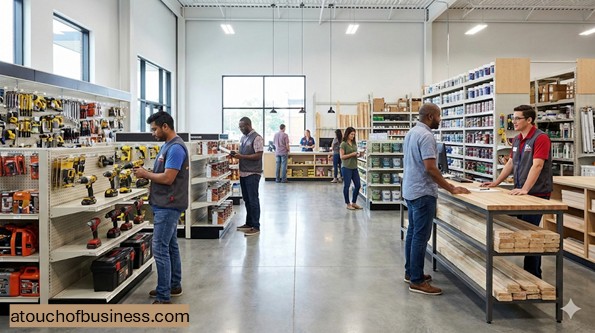
Startup Checklist for a Hardware Store: Legal and Setup
How to Start a Hardware Store
A neighborhood hardware retailer looks simple from the outside. People walk in with a problem, and they leave with a part, a tool, or a plan.
From a startup view, this is a storefront business built around inventory, space, and trust. Your job before opening is to prove the store belongs in your area and that your setup can support it.
This is not a business most people start from a spare room. A small shop can open with an owner and one part-time helper, but it still needs enough inventory and fixtures to feel “real” on day one.
Reality Check Before You Start
Before you pick a location or order a single item, slow down and pressure-test yourself. A store can be a great fit, but it also comes with responsibility you cannot pass off.
If you want a broader readiness checklist, start with points to consider before starting a business. Then read why passion matters before you start so you understand what keeps you going when things get tense.
Ask yourself this exact question: “Are you moving toward something or running away from something?” If the answer is “running,” pause and sort that out first.
Also take a calm look at the flip side. Are you ready for uncertainty, longer days, and problems that land on your desk first? Do the people close to you support the idea, including the time it will take?
Finally, get real input. Talk to owners in the same line of business, but only in a non-competing area. Use this inside-look guide to structure what you ask and what you observe.
Here are questions that tend to get honest answers:
- What did you underestimate before you opened, and what would you do earlier next time?
- Which departments or services matter most in your area, and which ones disappoint?
- What does a “good day” look like in the first six months, and what warning signs show up early?
Common Business Models You Can Choose From
Pick a model that matches your budget, your time, and your local demand. When people skip this step, they often build a store that looks nice but does not match how the area actually shops.
These are common models for an independent hardware retailer:
- Neighborhood general store: broad mix for homeowners and renters, focused on quick fixes and weekend projects.
- Contractor-friendly counter: trade accounts, repeat orders, and special ordering, often with deeper stock in a few key categories.
- Specialty-first store: strong focus in a narrow area, like fasteners, paint, lawn and garden, or tools.
- Co-op or affiliate approach: you operate independently but align with a larger brand or cooperative for purchasing, programs, and support.
- Second-location extension: you buy an existing store or add a location after proving demand in one area.
Your model also affects staffing timing. A small shop may run with an owner plus limited help at first. A larger footprint with wider hours and deeper services will usually need more staff from day one.
Step 1: Define What You Will Be Known For
Start with a simple promise: what problems do you want to solve, and for whom? If you try to be everything to everyone from day one, you will spread your budget thin.
Think in departments and use-cases, not in “cool products.” Your early focus might be repairs, basic tools, builders’ hardware, plumbing parts, electrical parts, and seasonal needs that match your area.
Step 2: Decide How You Will Generate Revenue
A retail shop can earn from walk-in sales, contractor accounts, special orders, and service add-ons. The key is choosing what you can support with space, staff, and local demand.
Keep your plan realistic. If you plan services like key cutting or paint mixing, plan for equipment, training, and a clean workflow before you open.
Step 3: Choose Your Ownership and Time Commitment
Decide whether you will start solo, with partners, or with outside investors. This affects control, risk, and how fast you can scale your inventory and buildout.
Also decide whether you are full-time from the start. A storefront is usually not a casual side project, because customers expect consistent hours and reliable stock.
Step 4: Validate Demand and Profit Potential
Demand is not just “people live here.” You want proof that local customers need the categories you plan to stock and will purchase locally instead of driving to a big-box store or ordering online.
Use a structured approach to demand checks, including local observation and competitor review. If you want a simple framework, use this market-demand checkup and write down what you learn.
Then look at profit reality. Some products move fast but leave less room to cover rent and labor. Others sit longer but can support healthier margins. You do not need perfect numbers yet, but you do need a plan that can cover fixed costs.
Step 5: Decide on the Right Location and Trade Area
For a storefront, location is not just traffic. It is access, parking, visibility, safety, and whether the area fits your customers.
Before you commit, review location factors and how they connect to the kind of store you are building. Use this location guide to think through the decision.
Also confirm the location can legally operate as retail in that building and zone. The U.S. Small Business Administration includes location planning factors in its location guidance.
Step 6: Build Your Startup Cost List Before You Estimate Anything
Do not start with a guess. Start with a list. Your list becomes your plan, and your plan becomes your budget.
Use a structured method so you do not miss major categories like fixtures, signs, deposits, initial inventory, and professional help. A solid starting point is this startup cost checklist.
Think about the flip side here, too. A smaller footprint lowers rent, but it can also limit the inventory that makes customers choose you. A larger footprint increases fixed costs and usually increases staffing needs.
Step 7: Line Up Suppliers and Your Opening Inventory Plan
Supplier planning is a startup step, not an “after we open” task. You need to know what you can order, how fast you can restock, and what terms you can qualify for.
Plan a first-wave inventory list by department. Include basics, fast-moving repair parts, and the categories you want to be known for. Build in a plan for special orders so you can say “yes” without holding every item in stock.
Step 8: Set Your Pricing Approach Early
Pricing is not only about being competitive. It is about covering your costs, supporting your service level, and staying consistent.
If you want a practical way to think about pricing, use this pricing guide as a baseline and document how you will price core categories, specials, and services.
Step 9: Write a Business Plan You Can Actually Use
You do not need a plan only if you want a loan. You need a plan because it forces you to connect the dots between demand, location, inventory, staffing, and costs.
If you want a clear structure, use this practical business plan guide. For a federal resource, the U.S. Small Business Administration explains key parts in its business plan guidance.
Keep it grounded. Your plan should show how you will open, what you will stock, what you will spend, and what needs to be true for the store to break even.
Step 10: Decide How You Will Fund the Startup
Funding can come from savings, partners, or financing. A retail launch often needs more cash up front than people expect because inventory and fixtures happen before revenue.
If you plan to explore financing, start with a clear understanding of what lenders tend to look for and what you need to prepare. A good overview is this business loan guide.
Also plan your basic banking and account setup early. You want clean records from day one, even if you are small at the start.
Step 11: Register the Business and Set Up Tax Accounts
Most owners start by choosing a simple legal structure and then adjust as the store grows and risk increases. Many people begin as a sole proprietor and later move to a limited liability company as the business expands, but your best path depends on your situation.
For a plain-language overview, see this business registration guide. The U.S. Small Business Administration also covers the basics in its registration guidance.
At the federal level, you may need an Employer Identification Number. The Internal Revenue Service explains how to get one in its Employer Identification Number guidance.
For sales and use tax registration, rules are state-based. A reliable starting point is USA.gov’s state and local tax guidance, which points you to the right state agency.
Step 12: Confirm Local Licenses, Zoning, and Occupancy Rules
Local rules can decide whether you can open at a specific address and what approvals you need before you unlock the doors. This often includes zoning approval and building sign-off for the type of space you are using.
Ask your city or county where to verify business licensing, zoning, and whether a Certificate of Occupancy (or similar occupancy approval) is required for your situation. Keep your notes simple: who you spoke with, what they said, and what they told you to file.
If you will install exterior signs, confirm local sign rules early. You can also review planning points in this business sign guide so you know what to ask your local office.
Step 13: Set Up Insurance and Risk Controls Before Opening
Some insurance coverage is required in certain situations, and many coverages are optional but common for storefront retail. Your needs depend on the building, the lease, employees, and what you stock.
Use this business insurance overview to understand common categories and what to discuss with a licensed agent. If you plan to hire employees, start with your state’s workers’ compensation requirements; USA.gov’s workers’ compensation page helps you find the right state office.
Step 14: Lock In Your Name, Domain, and Basic Identity
Pick a business name you can use legally and consistently. This includes checking availability in your state and making sure it works online.
A practical starting point is this guide to choosing a business name. Then claim a matching domain and social profiles before someone else does.
Keep brand identity simple at first. A clean logo, basic colors, and a consistent look across your storefront, signs, and website are enough to start. If you want a checklist, review corporate identity package basics.
Step 15: Set Up Payments, Sales Systems, and Employee Basics
Plan how you will accept payment, process returns, and track inventory at checkout. Your point-of-sale setup affects speed, accuracy, and how clean your records are.
If you will hire at launch or soon after, plan the basics early. Use this hiring timing guide to decide when you truly need help versus when you can wait.
For federal wage and hour context, the U.S. Department of Labor explains overtime basics in Fact Sheet 23. For employment eligibility verification, use the Form I-9 resource page.
Step 16: Prepare the Space and Stock for Pre-Opening
This is where planning turns physical. Your job is to finish buildout, install fixtures, and stage the store so it feels organized and easy to shop.
Think about the flip side again. A store that looks full but is disorganized frustrates customers. A store that looks empty may feel unreliable, even if your prices are good.
If you stock hazardous chemicals like solvents or flammable liquids and you have employees, build safety planning into your setup. Occupational Safety and Health Administration standards to consider include the Hazard Communication Standard and the Flammable Liquids standard (29 CFR 1910.106). Local fire code enforcement is handled by your local authority, so verify expectations before opening.
Step 17: Plan Your Pre-Launch Marketing and Opening Push
Do not wait until the last week to tell people you exist. Start with clean basics: a simple website, accurate hours, clear categories, and a way to contact you.
If you need a plain plan for getting online, use this website planning guide. For storefront marketing ideas, review practical ways to get customers in and keep the plan realistic for your time and budget.
If you plan a grand opening, keep it simple and measurable. Use this grand opening planning guide to choose a format that fits your store and your community.
Essential Startup Items and Budget Drivers
This is the “what must exist before opening” list. Use it as a build-and-buy checklist, then get quotes based on your exact space and the scope of your inventory.
For pricing guidance, think in cost drivers, not perfect numbers. Size, condition of the space, local labor rates, and how deep your opening inventory is will move your budget more than almost anything else.
Store Fixtures and Merchandising
Fixtures often scale with square footage and how many departments you carry. Used fixtures can reduce startup spending, but they may not fit your layout or look consistent.
- Gondola shelving and endcaps
- Pegboard or slatwall with hooks
- Fastener bins and drawer cabinets
- Locking display cases for high-theft items
- Checkout counter and work surfaces
- Aisle and department signs
- Shopping baskets and carts
Point-of-Sale and Payments
Your costs depend on whether you choose a basic setup or a more advanced system with deeper inventory features. Plan for hardware, software, and reliable internet.
- Point-of-sale terminal and register hardware
- Barcode scanners
- Receipt printer and cash drawer (if used)
- Card payment terminals
- Label printer for shelf tags and barcodes
- Back-office computer and network equipment
Receiving and Stock Handling
This is the area new owners often underestimate. Receiving and restocking get harder when you do not have the right tools and storage from day one.
- Receiving table or workbench
- Hand trucks and dollies
- Stock carts and flatbeds
- Pallet jack (based on deliveries)
- Backroom shelving and labeled storage
- Step stools and ladders
Security and Cash Control
Security spending depends on layout, product mix, and neighborhood risk. Plan for deterrence and visibility, not just recording video.
- Video camera system with recording
- Alarm system and door contacts
- Locking storage for higher-value inventory
- Safe or secure cash storage (if used)
Service Stations (Only If You Offer Them)
Services can help you stand out, but only if you can run them reliably. Each service adds training and workflow needs.
- Key cutting equipment and key blanks organization
- Paint mixing equipment and tint storage (if selling paint)
- Rope or chain cutting tools and measuring tools
- Screen repair tools and a dedicated work surface
Safety and Compliance Readiness
Costs here depend on what you stock and how you store it. Plan early if you carry solvents, aerosols, or other regulated products.
- Safety Data Sheet access method for hazardous products (for employee access, if you have employees)
- Labeling supplies for chemicals where required
- Spill kit appropriate to stocked liquids
- First aid kit and emergency supplies
- Fire extinguishers as required by local code enforcement
Legal and Compliance: Keep It Simple and Verifiable
Your goal is not to memorize every rule. Your goal is to know who governs what and how to verify your specific requirements.
Start with a short binder or digital folder that holds your registrations, approvals, and inspection records. Keep copies of what you file and the confirmation pages you receive.
Federal Checks
Common federal touchpoints include your tax identification and employee rules if you hire. If you are open to the public, you also need to plan for accessibility standards.
- Employer Identification Number: verify using Internal Revenue Service guidance.
- Overtime basics: verify using U.S. Department of Labor Fact Sheet 23.
- Form I-9: verify using U.S. Citizenship and Immigration Services resources.
- Public accessibility: review ADA Title III information.
- Product safety and recalls: review Consumer Product Safety Commission retailer guidance.
State Checks
Your state sets the rules for business formation, sales tax registration, and most employer accounts. Start with your Secretary of State or the state business portal, then confirm the tax agency for sales and payroll-related accounts.
- Business registration: start with SBA registration guidance and then follow your state’s official filing path.
- Sales tax registration: use USA.gov state tax guidance to reach your state tax agency.
- Workers’ compensation: use USA.gov workers’ compensation guidance to find your state office.
City and County Checks
Local offices decide what can operate at a specific address, what inspections are required, and what signs you can install. This is also where you confirm local business licenses.
- Business licensing: search your city or county site for “business license” or “business tax registration.”
- Zoning and use: confirm retail use is allowed at the address before signing a lease.
- Occupancy approval: ask the building department whether a Certificate of Occupancy (or similar approval) applies to your situation.
- Sign rules: confirm permit needs before ordering signage, and review sign planning considerations so you ask the right questions.
Varies by Jurisdiction: What to Double-Check Locally
This short checklist helps you avoid guessing. Treat it as a verification list, not as a prediction of what your area will require.
If an item applies, get the local office name, the official page, and the filing steps. Then keep a record of what you submitted and what was approved.
- Is a general business license required for your address?
- Is retail use permitted under zoning for that exact location?
- Is a Certificate of Occupancy required due to a change of use or renovations?
- Are there local fire inspections tied to what you stock, like flammable liquids?
- Are there sign permits for exterior signs, window signs, or illuminated signs?
Smart questions to ask locally:
- What approvals must be complete before I can open to the public?
- If I install shelving, counters, or signs, which items require permits and inspections?
- If I stock solvents, aerosols, or propane exchange, what local fire rules apply?
A Day in the Life of the Owner
In the early months, your day is split between the floor and the backroom. You are watching what customers ask for, what sells, and what slows the checkout line.
You will also deal with supplier communication, special orders, and making sure new inventory gets stocked in the right place. It is less about “running a store” and more about preventing small issues from piling up.
Late in the day, you often review what is running low, what needs reorder decisions, and what approvals or paperwork still need follow-up. If you are hiring, you may also spend time on schedules and basic employee setup.
Red Flags to Watch For Before You Commit
Red flags are not always dramatic. Many are quiet signs that the location, the numbers, or the compliance path will fight you the whole way.
If you are buying an existing business, you also need to confirm what is real versus what is assumed, especially around inventory and the condition of fixtures.
- Location uncertainty: the landlord cannot confirm zoning fit, or local offices give unclear answers about retail use at that address.
- Occupancy issues: the space has unresolved permit history, or renovations are needed without a clear inspection path.
- Inventory that cannot be verified: the seller cannot support inventory counts with clear records, or stock appears disorganized with many unlabeled items.
- Compliance gaps: hazardous products are present but there is no plan for Safety Data Sheets access or labeling where required.
- Supplier dependence: the plan relies on a single supplier with no backup, and you cannot verify lead times or reorder reliability.
- Lease pressure: you are rushed to sign before confirming local approvals and total buildout needs.
When to Get Professional Help
You do not need to do everything alone, and you do not need to learn every specialty the hard way. The goal is to do things correctly and keep your stress low.
If you want a clear approach, build a small circle of advisors early using this guide to professional advisors. This can include a qualified accountant, a business attorney, and an insurance agent who understands retail storefront risk.
Professional help can also make layout planning, signage decisions, and identity work easier. Use tools like corporate identity guidance so you can give a designer clear direction without guessing.
101 Tips for Managing Your Hardware Store
These tips cover a lot of angles, from inventory to safety to customer trust.
Not every idea will fit your store, and that is normal.
Keep this page handy so you can come back when a new problem shows up.
Work on one tip at a time and get it stable before you add another.
What to Do Before Starting
1. Define what you want to be known for in one sentence, like “fast repair parts” or “contractor-ready stock,” and let that guide every decision.
2. Spend time inside each nearby competitor during busy hours and write down what they do well and what they ignore.
3. Choose your opening departments on purpose and avoid spreading your first inventory order across too many categories.
4. Estimate how much selling space and backroom space you need based on the departments you chose, not on what looks affordable.
5. Build your first inventory list around common repairs in your area, then add project-based add-ons that support higher tickets.
6. Price-check a set of everyday items at competitors so you understand where you must be close and where you can be different.
7. Decide which services you will offer at opening, and only offer what you can deliver quickly and consistently.
8. Choose whether you will support trade accounts, because invoices, purchase orders, and delivery expectations change how you operate.
9. Pick a checkout system that tracks inventory with each sale, and test scan speed before you commit.
10. Confirm supplier lead times, minimum orders, and return rules early, because these shape how much cash you must keep available.
11. Plan for loss prevention before you set shelves, including sight lines, camera coverage, and where you place high-theft items.
12. Verify local requirements for flammable and pressurized products if you plan to carry them, because storage limits can affect your assortment.
13. Review your lease for restrictions on signage, exterior storage, loading times, and equipment installation before you sign.
14. Ask an insurance professional how your product mix and services change your coverage needs, then update your plan before opening day.
15. Set a cash buffer for inventory swings and slow seasons, and treat it as part of the startup cost, not a nice-to-have.
What Successful Hardware Store Owners Do
16. Walk the sales floor daily with a short checklist and fix the small things before they become a pattern.
17. Track your top sellers and protect them from stockouts, because customers judge your store by what is missing.
18. Keep product locations disciplined, because every “temporary spot” becomes a permanent source of waste and confusion.
19. Use cycle counts instead of rare full counts, and count more often in small, high-value sections.
20. Train staff to start with the customer’s problem, not the product, so they ask better questions and make fewer wrong recommendations.
21. Build a simple “parts matching” reference binder or digital folder for common fixes, and keep it updated as you learn.
22. Time your service tasks like key cutting or paint mixing so you know where lines form and where training is needed.
23. Treat returns as data, not just a refund, and track why items come back so you can improve labels and advice.
24. Lock down high-theft items with smart placement and controlled access, while still keeping shopping easy for honest customers.
25. Keep steady vendor communication and review performance regularly, because supplier issues often show up as customer complaints.
26. Check shelf tags and promotional signs for accuracy each week, because pricing confusion breaks trust fast.
27. Create a routine to monitor product recalls and remove affected items immediately when needed.
28. Maintain organized Safety Data Sheets for hazardous products you carry, and make sure staff knows how to access them.
29. Run short weekly team huddles focused on what customers asked for and what problems staff struggled to solve.
30. Use a monthly scorecard that includes sales, gross margin, inventory value, shrink indicators, and the top causes of returns.
Running the Business (Operations, Staffing, SOPs)
31. Set a receiving schedule and stick to it, because random deliveries lead to rushed counts and stocking errors.
32. Require an order record for every inbound shipment so you can match what arrived to what you expected.
33. Count cartons and key items at the door, because the cheapest time to catch an error is before it hits the shelf.
34. Separate “ready to stock” items from “needs research” items so staff does not guess where things belong.
35. Use a quarantine shelf for damaged goods and vendor returns so they do not drift back into sellable stock.
36. Label bins and shelves with clear product codes and locations so anyone can restock without tribal knowledge.
37. Standardize shelf tags with consistent units, sizes, and pack counts so customers can compare without asking for help.
38. Use endcaps to solve common jobs, like “fix a leaky sink,” because customers buy faster when the parts are together.
39. Cross-merchandise the add-on items near the core item, like anchors near drills or sealant near plumbing parts.
40. Create a clearly labeled will-call area for contractor pickups so held orders do not get reshelved by mistake.
41. Set reorder points for critical items, and review them monthly so they match real sales patterns.
42. Adjust reorder points for seasonal items before demand spikes, because late orders often arrive after the rush.
43. Do a weekly out-of-stock walk and fix the cause, whether it is ordering, receiving, or stocking discipline.
44. Set a plan for slow movers, including markdown timing and vendor return options, so shelves do not become storage.
45. Create a written special-order policy that covers deposits, timelines, and returns, and make sure customers see it before they commit.
46. Standardize how you process vendor returns and credits, because inconsistent follow-up quietly drains cash.
47. Limit override permissions at the register, because uncontrolled discounts quickly become “the normal price.”
48. Require a second person check for large refunds or manual price changes to reduce errors and fraud.
49. Reconcile sales and cash daily, and investigate differences immediately while the shift is still fresh.
50. Set a consistent deposit routine that fits your risk level and local banking access.
51. Place cameras where they protect the register, entrances, and high-theft zones, and verify they are recording.
52. Train staff to greet customers quickly, because simple visibility reduces theft and improves service.
53. Teach theft response with safety first, and make sure staff knows what they should never do in a confrontation.
54. Write standard operating procedures for receiving, stocking, returns, and special orders so the store runs the same way every day.
55. Use opening and closing checklists so critical tasks are not “remembered” differently by each person.
56. Schedule labor around real traffic, not guesses, and revisit the schedule after each season change.
57. Train new staff on the highest-volume categories first so they can help confidently within their first week.
58. Keep a simple skills chart that shows who can handle key tasks, then train the gaps on purpose.
59. For cutting services, use consistent measuring tools and clear procedures so the customer gets the same result every time.
60. If you mix paint, follow the equipment maker’s cleaning and calibration guidance to reduce color issues and waste.
61. Store flammable products based on applicable rules and local fire expectations, and keep storage areas uncluttered.
62. Keep aisles, entrances, and checkout areas clear for customer safety and accessibility.
63. Review expectations under the Americans with Disabilities Act and fix obvious barriers, especially after any store layout change.
64. If you employ staff, post required labor notices and confirm you are following wage and hour rules in your state.
65. Follow Payment Card Industry Data Security Standard (PCI DSS) practices by not storing sensitive card data and by using approved payment equipment.
66. Limit who can export sales data and customer data, and log when it happens, because internal data leaks are preventable.
67. Create a “stop sale” process for recalled or unsafe products so staff knows exactly what to do the moment you learn about an issue.
68. Keep an incident log for injuries, near misses, and hazards, then review it monthly to spot patterns.
69. Plan routine maintenance for doors, lighting, shelving stability, and equipment so breakdowns do not hit during peak periods.
70. Review financial statements monthly with a professional if needed, and focus on a few key drivers instead of getting lost in details.
What to Know About the Industry (Rules, Seasons, Supply, Risks)
71. Plan seasonal resets early, because the right product in the wrong month becomes dead stock.
72. Stock for your local weather reality, not generic season calendars, because storms and heat waves shift demand fast.
73. Watch local building and remodeling activity, because it often predicts which repair categories will surge next.
74. Decide whether you want to serve contractors deeply, because they value reliability more than novelty.
75. If you sell hazardous chemicals and employ staff, understand hazard communication expectations and keep labels and Safety Data Sheets organized.
76. Treat flammable liquid storage as a safety system, not a backroom habit, and confirm what your local authority expects.
77. Store aerosols thoughtfully and avoid heat exposure, because pressure containers can create safety issues when mishandled.
78. If you offer propane exchange or similar services, verify state and local rules before you install cages or signage.
79. Set a clear plan for handling used household batteries if you accept them, because improper handling can cause fires.
80. If you generate hazardous waste from damaged products, learn the basics of generator requirements and keep disposal records.
81. Assume shrink exists and plan for it with visibility, procedures, and training instead of hoping it will not happen.
82. Review your insurance annually and after big changes, like expanding departments or adding new services.
83. Keep at least one backup supplier for critical categories so you can recover when a primary source is out.
84. Decide on online ordering and local delivery based on what your customers actually ask for, not on what competitors do.
85. When rules or standards change, update training and signage quickly, because small compliance gaps tend to become big problems later.
Marketing (Local, Digital, Offers, Community)
86. Keep your business listings accurate everywhere, because wrong hours cost you easy sales.
87. Treat reviews as a system: ask for them consistently, respond calmly, and fix the root cause behind complaints.
88. Make your website useful, with clear departments, services, hours, and a phone number that gets answered.
89. Create simple “problem solution” landing pages for common repairs in your area so local search results match real needs.
90. Build ready-to-go project kits for common jobs and place them where customers naturally pause and look around.
91. Partner with local community groups, schools, or nonprofits in ways that match your store, like basic home repair education.
92. If you serve contractors, send a short weekly stock update and highlight what is available today, not what might arrive soon.
93. Use receipts and follow-up messages to ask what went well and what was hard, then apply the feedback to training and signage.
94. Track marketing results by asking customers how they found you, and write it down at the register for a few weeks each quarter.
95. If you run promotions, tie them to clear goals like moving slow inventory or launching a new category, not just “doing a sale.”
96. Keep social posts practical and local, like quick repair tips and seasonal reminders, because helpful content builds trust.
Dealing with Customers (Trust, Education, Retention)
97. Use a standard set of questions to diagnose needs, including what they are fixing, the dimensions, the material, and the brand or model when relevant.
98. When you are unsure, be honest, offer the safest next step, and suggest a trade professional when the risk is high.
99. Make policies visible at the point of purchase for special orders and high-return categories so there are no surprises later.
100. Handle complaints with a simple flow: listen without interrupting, restate what you heard, and offer a clear next step.
101. Turn repeat questions into better labels and signage, because every question you prevent frees up staff to help with harder problems.
FAQs
Question: Can I start this business solo, or do I need staff from day one?
Answer: A small shop can start with an owner and limited help, but a larger footprint usually needs staff for coverage, receiving, and service tasks.
Match staffing to store hours, service promises, and how much inventory you will handle each week.
Question: What business model should I choose for a new hardware retailer?
Answer: Common paths include an independent store, a niche-focused store, or an affiliate approach tied to a larger program.
Pick the model that fits your cash, your space, and the customers you want most.
Question: How do I choose a location that can actually support the store?
Answer: Start with access, parking, visibility, and a trade area that matches your target customers.
Verify zoning and allowed use for the exact address before you sign a lease.
Question: What licenses and permits do I need to open, and where do I check?
Answer: Requirements vary by state and city, so treat this as a verification task, not a guessing game.
Start with federal and state basics, then confirm local licensing, zoning, and occupancy approvals with your city or county offices.
Question: Do I need an Employer Identification Number, and how do I get one?
Answer: Many businesses need an Employer Identification Number for taxes, banking, or payroll.
You can apply directly through the Internal Revenue Service and avoid paid third-party sites.
Question: How do I set up sales tax collection for a retail store?
Answer: Sales and use tax rules are state-based, and you usually register with your state tax agency.
Confirm whether your products are taxable and when you must start collecting before your first sale.
Question: What insurance do I need before opening?
Answer: Some coverage is required in certain cases, and many landlords require coverage as a lease condition.
If you will have employees, workers’ compensation requirements are set by the state and often apply quickly.
Question: What equipment must be in place before opening day?
Answer: You need fixtures for display, a point-of-sale system that tracks inventory, receiving tools, and basic security.
If you offer services like key cutting or paint mixing, the service equipment and training must be ready before you advertise it.
Question: How do I choose suppliers and build my opening inventory?
Answer: Start with suppliers that can restock reliably, have clear return rules, and support special orders.
Build opening inventory around common local repairs and fast-moving basics, then expand into deeper categories after you see demand.
Question: How should I set up pricing before I open?
Answer: Price the everyday items so you are credible, then plan margins for specialty items and service add-ons.
Document your rules for discounts, matching, and employee overrides so pricing stays consistent.
Question: If I carry solvents, aerosols, or other hazardous products, what compliance steps apply?
Answer: If employees may be exposed to hazardous chemicals, you must follow Hazard Communication requirements like labels and Safety Data Sheets access.
Flammable liquid storage and handling rules can also apply, and local fire enforcement may add requirements based on amounts stored.
Question: Do I need to plan for accessibility rules in the store layout?
Answer: Stores open to the public are expected to meet accessibility requirements under the Americans with Disabilities Act.
Plan aisle width, entrances, counters, and paths of travel before you install fixtures so you do not have to redo work later.
Question: What are the most important numbers to track each week?
Answer: Track sales, gross margin, inventory on hand, out-of-stocks on top items, and shrink indicators.
Also track returns reasons and special-order issues, because they often point to training or labeling problems.
Question: What is a simple receiving process that prevents inventory errors?
Answer: Count shipments at receiving, match them to the order record, and separate damaged or unknown items right away.
Only stock items after they are correctly set up in your point-of-sale system with the right description and barcode.
Question: How do I reduce theft risk without turning the store into a fortress?
Answer: Use strong sight lines, camera coverage, controlled placement of high-theft items, and consistent employee greetings.
Focus on routines and visibility, not confrontations, and train staff on safety-first responses.
Question: When should I hire my first employee, and what do I need to do first?
Answer: Hire when your hours, receiving load, or service tasks are causing delays or errors you cannot fix alone.
Before the first shift, confirm work eligibility steps and understand wage and hour rules like overtime for covered employees.
Question: How do I stay safe with payment card data?
Answer: Use approved payment systems, limit who can access payment settings, and avoid storing sensitive card data.
Payment Card Industry Data Security Standard guidance applies to merchants of all sizes, so keep your setup simple and compliant.
Question: What should I do when a product is recalled or seems unsafe?
Answer: Have a stop-sale process so staff can pull affected items fast and prevent new sales.
Maintain records that help you trace where products came from and follow product safety guidance for retailers.
Question: How do I manage cash flow when inventory absorbs so much cash?
Answer: Set reorder points, avoid overbuying slow movers, and time big orders to match demand cycles.
Build a cash buffer for seasonal swings and supplier delays so you are not forced into panic decisions.
Question: What do I do with damaged or expired chemicals and similar waste?
Answer: If you generate hazardous waste, rules depend on how much you generate in a month, not the size of your business.
Identify your generator category and use authorized handlers for disposal, since state rules can be stricter than federal baselines.
Question: What are the most common early mistakes new owners make?
Answer: Overbuying inventory, underbuilding receiving and stocking routines, and letting pricing and returns decisions drift.
Another common issue is skipping local verification for zoning, occupancy approvals, and product storage rules until it is too late.
Related Articles
- Starting a Home Renovation Business
- Starting a Bathroom Renovation Business
- Deck Building Service
- Start a Plumbing Business
- Electrician Business Startup Overview
- Start a HVAC Business
Sources:
- ADA.gov: Businesses Open Public
- ATF.gov: Federal Firearms Licenses
- CPSC.gov: Retailers Product Safety
- DOL.gov: Fact Sheet 23 Overtime Pay
- EPA: Hazardous Waste Generators
- FTC: Deceptive Pricing Rule
- IRS.gov: Get employer identification
- NHPA: Employee inventory training
- NRF: National retail security survey
- OSHA.gov: Flammable liquids 1910.106, Hazard communication 1910.1200
- PCI SSC: Merchant resources
- SBA.gov: Apply licenses permits, Pick your business location, Register your business, Write your business plan
- USA.gov: Pay state local taxes, Workers compensation
- USCIS.gov: I-9 employment eligibility