
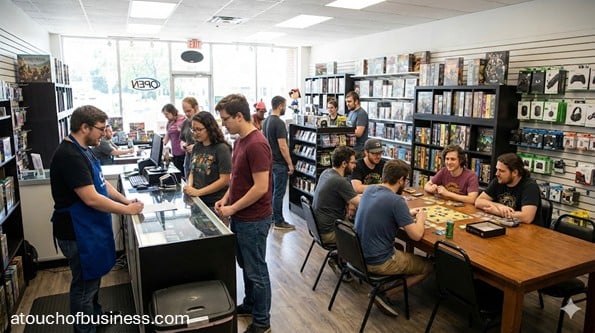
Retail Game Store Overview
Opening a retail game store can feel exciting and intimidating at the same time. It’s tough when you have a clear vision but don’t yet know what comes first.
A retail game store is a public-facing shop that sells games and gaming-related products, and may also host in-store play. Your startup job is to prove demand, pick a store model you can run, and get legal and physical setup done right.
How Does a Retail Game Store Generate Revenue
You earn income by selling products at retail pricing and building repeat visits. Some stores add events and special ordering to support early sales.
Common revenue categories include new games, trading card game products, role-playing game books, miniatures and hobby items, accessories, and curated gift items.
What You’ll Offer and Who You’ll Serve
Your product mix depends on your local demand and the space you lease. The goal is to stock what your customers actually want, not what looks good on paper.
Typical customers include families and gift shoppers, tabletop players, trading card game players, role-playing game groups, collectors, and hobbyists looking for a place to shop and connect.
Pros and Cons to Weigh Before You Start
This business can be started small, but a storefront lease and launch inventory can raise the cash needed. Most first-time owners start with one location and keep staffing lean until sales are steady.
Before you commit, run your own readiness check with Points to Consider Before Starting Your Business.
- Pros: Multiple product categories let you test what sells; local community interest can support repeat sales; special orders can fill gaps without overstocking.
- Cons: Up-front inventory and fixtures can be significant; a poor location or lease can limit growth; events add scheduling and space needs if you include them.
Step 1: Decide If Owning a Business and This Business Fit You
Start here, even if you want to skip it. You need to decide whether owning a business is right for you and whether a retail game store is right for you.
Passion matters because it helps you push through problems. Without it, people often look for an exit instead of finding solutions, which is why it helps to read why passion matters before you start.
Step 2: Do a Motivation Check Before You Spend Anything
Ask yourself one question and answer it honestly: “Are you moving toward something or running away from something?”
If you’re starting only to escape a job or fix a short-term financial problem, motivation often fades when the work gets real. You want a reason that can carry you past the first hard season.
Step 3: Check Risk, Responsibility, and Your Support System
A storefront business can bring long hours, uncertain income early on, and full responsibility when things go wrong. Vacations are often fewer at the start, and “off” time can shrink.
Talk with your household about time, budget, and expectations. Also ask yourself if you have (or can learn) the skills and secure funds to start and operate through the ramp-up period.
Step 4: Talk to Experienced Owners You Will Not Compete Against
Real insight often comes from owners who already did what you’re about to do. Only talk to owners you will not be competing against.


Use Business Inside Look as your guide, then ask questions like these.
- What surprised you most during your first 90 days open, and what would you do differently before opening?
- Which product categories sold first in your area, and which ones sat longer than you expected?
- What lease terms or location details mattered more than you thought once you opened?
Step 5: Choose a Store Model and a Realistic Scale
Pick a model you can run with your time and cash. Decide if you’ll be retail-only, retail plus in-store play, or retail with a stronger online focus.
Most first stores can start owner-run with limited staff, but coverage matters. If you plan events or long hours, you may need at least part-time help sooner than you think.
- Solo owner: Lower payroll early, more personal workload, tighter hours.
- Partners: Shared funding and workload, but you need clear roles and agreements.
- Investors: More capital, but more accountability and formal planning.
Step 6: Validate Demand and Profit Room in Your Area
You’re not just proving that people like games. You’re proving they will spend enough, often enough, for you to cover bills and pay yourself.
Start with a practical demand check using Market Demand Checkup, then verify margin room with local pricing and supplier terms.
- Visit competitors and note category focus, shelf depth, event space, and foot traffic at different times.
- Price-check common items across local stores and large online retailers, then compare to your expected wholesale costs.
- Estimate how many sales per day you need to cover rent, utilities, insurance, taxes, and your pay.
Step 7: Choose Your Location Approach
If you’re opening a storefront, customer convenience matters. Your goal is to make it easy for your local customers to visit, park, and return.
Use how to choose the best location to compare areas, then screen each option for zoning and occupancy requirements before you sign anything.
Step 8: Choose a Name and Lock Down Your Online Identity
Pick a name you can legally use and that customers can remember. Then secure a matching domain name and social handles, as available.
Work through a naming process using these business name tips, then document your final choice for filings and vendor accounts.
Step 9: Decide on a Legal Structure That Matches Your Risk
Many U.S. small businesses start as sole proprietorships because it’s the default when no state formation is filed. Many later form a limited liability company for liability and structure, and it can also help with banking and partner expectations.
If you’re signing a lease, stocking a retail space, and inviting the public into your store, you’re taking on real risk. If you’re unsure, talk to a qualified professional so you form the right structure the first time.
Step 10: Register the Business and Set Up Tax Accounts
This is where many first-time owners feel overwhelmed, and that’s normal. Keep it simple: follow your state’s steps, and verify each requirement with the correct office.
Start with this step-by-step registration guide, and cross-check federal and state tax identifiers using the U.S. Small Business Administration’s guidance on federal and state tax ID numbers.
- Employer Identification Number: Apply with the Internal Revenue Service using the official page for getting an employer identification number.
- Employment taxes (if you hire): Review the Internal Revenue Service overview on understanding employment taxes.
- State sales tax (if your state has it): Register with your state Department of Revenue or similar agency before making taxable retail sales.
Step 11: Confirm Local Licenses, Zoning, and Building Approval
A retail store is location-dependent, and local rules can stop your launch if you skip this step. Treat it as a gate you must clear before you commit to a lease or build-out.
Use the U.S. Small Business Administration overview on licenses and permits to frame what to look for, then verify your exact requirements with your city and county.
- General business license: Often required for local businesses, but rules and names vary.
- Zoning approval: Confirm retail use is allowed at the address before signing.
- Certificate of Occupancy: Often required for a public storefront depending on local rules and space changes.
- Accessibility: If you are open to the public, review the Department of Justice guidance for businesses open to the public under Americans with Disabilities Act Title III.
Varies by Jurisdiction
Rules can change by state, county, and even by city. Don’t guess. Confirm each requirement with the right office and keep a simple file with your confirmations.
Use this checklist to verify locally, and ask a few direct questions so you don’t miss a step.
- State business filing office (often Secretary of State): Search “business entity search” and “form an LLC” for your state.
- State Department of Revenue: Search “sales tax permit” and “sales and use tax registration” for your state.
- City or county business licensing portal: Search “business license apply” + your city or county name.
- Planning and zoning department: Search “zoning map” + your city name, then confirm the address use.
- Building department: Search “certificate of occupancy” + your city name and ask about inspections tied to your planned use.
- Smart questions to ask: Is “retail sales” allowed at this address under current zoning? Do I need a Certificate of Occupancy before opening? Do I need a separate sign permit before installing exterior signage?
Step 12: Line Up Suppliers and Build Your Launch Inventory Plan
You’ll likely use distributors and publisher accounts to source products. Each supplier can have its own requirements, so plan time for approvals and account setup.
If events are part of your model, review program requirements early. For example, Wizards Play Network provides a guide on how to apply for the WPN, and Play! Pokémon has an official process for submitting a store application.
- Write a launch assortment list by category and quantity.
- Include accessories that support your core categories.
- Plan for restocks based on what you expect to sell first.
Step 13: Set Pricing and Basic Sales Rules Before You Open
Pricing is not just a number. It must cover wholesale costs, overhead, and your pay while staying realistic for your local market.
Use this pricing guide to set your approach, then document simple rules for returns, special orders, and tax handling in your point of sale system.
Step 14: Write a Business Plan You Can Actually Follow
You need a business plan even if you aren’t seeking funding right now. It keeps you on track and forces you to prove your idea with real numbers.
Use how to write a practical business plan to build a plan that matches your store model, location, and launch budget.
- Define your store model and your target customers.
- Set realistic opening hours and staffing coverage.
- Lay out startup costs, monthly costs, and sales targets.
Step 15: Build Your Startup Items List and Price It
Make a detailed list of every item you need to open, then research estimated pricing for each item. Size and scale drive startup costs, so a small shop and a larger store will have very different totals.
Use Estimating Startup Costs to double-check that your list is complete before you price it out.
- Retail Fixtures and Displays: wall shelving, gondola shelving, slatwall or gridwall panels, hooks, display cases (locking), counter, feature tables, price label holders, shopping baskets.
- Point of Sale and Payments: point of sale system, barcode scanner, receipt printer, cash drawer, payment card reader, label printer for shelf labels.
- Computers and Network: office computer, router, Wi-Fi access point, basic office printer/scanner (optional), backup storage for records.
- Receiving and Storage: stockroom shelving, step ladder, hand truck or dolly, storage bins, packing table if you ship orders.
- Security: safe, locking hardware, camera system with recording, basic lighting for visibility.
- Play and Event Area (If You Offer It): tables, chairs, whiteboard or digital display for announcements, timer, trash and recycling bins.
- Brand Basics: exterior sign if allowed, interior signage, business cards, basic printed materials.
- Next action: For each item above, write a short spec (size, quantity, and quality level), then collect estimated prices from at least three sources.
Step 16: Get Funding in Place and Set Up Banking
Once you know your startup costs, decide how you’ll fund them. This can include personal savings, partners, or financing, depending on scale.
If you need financing, review how to get a business loan, then choose a financial institution and open your business accounts before you start paying vendors and rent.
Step 17: Set Up Insurance and Basic Risk Coverage
Even at startup, you need a risk plan. General liability insurance is common for retail storefronts, and landlords may require it as part of your lease terms.
Start with what to know about business insurance, then confirm your coverage requirements with your landlord and any event partners you plan to work with.
- Common coverage to review: general liability, property coverage for inventory and fixtures, coverage for computers and equipment.
- If you host events: ask whether additional coverage or limits are required by your lease or venue rules.
Step 18: Build Your Store Identity and Customer-Facing Assets
Your brand assets help people recognize you and trust you before you open. Keep it simple, consistent, and professional.
Use corporate identity guidance to outline what you need, then create only what supports your launch.
- Plan your business website with store hours, location, contact info, and product focus.
- Create simple printed items like business cards for vendor meetings and local outreach.
- Review business sign considerations before you order or install signage.
Step 19: Set Up the Space, Systems, and Your Opening Push
Now you’re turning plans into a store that can open. Focus on clean layout, clear pricing labels, reliable point of sale setup, and a smooth way to accept payment.
If you plan a storefront launch, use how to get customers through the door for simple local outreach, and consider grand opening planning if you want an opening-day push.
- Finish shelving, counters, display cases, and storage setup.
- Load product data in your point of sale system and test sales tax settings.
- Set basic policies you need on day one: returns, special orders, and damaged items.
- Decide staffing coverage and training needs using how and when to hire if you need help early.
- If you feel stuck, build a support team using professional advisors so you don’t carry every task alone.
Pre-Opening Checklist
This is your final pre-launch sweep. It’s tough when you’re tired and ready to open, but this is where small checks prevent big delays.
Walk through each item and confirm it is done before you set your public opening date.
- Legal and filings: entity registration complete if applicable, tax accounts set, and required local license approved.
- Location approvals: zoning confirmed, required building approvals complete, and any required Certificate of Occupancy cleared.
- Accessibility: customer paths and key areas meet public access needs based on Americans with Disabilities Act Title III guidance.
- Inventory: opening inventory received, counted, and shelved with clear pricing labels.
- Systems: point of sale tested, receipt printing works, and payment processing is ready.
- Insurance: required coverage in place for lease terms and any planned events.
- Marketing: website live, store listings updated, and opening message posted.
Recap and Is This the Right Fit for You
You’re ready to move forward when you can prove demand, afford the launch, and meet legal requirements for your location. The steps are not complicated, but they do require patience and follow-through.
This business fits you if you like helping people find the right game, can stick with steady work, and can handle risk without panicking. It may not fit if you need predictable hours, guaranteed income early on, or you dislike handling inventory and retail details.
Self-check: Can you name your target customers, explain your store model, list your startup items, and confirm your licenses and zoning before signing a lease?
101 Tips to Consider for a Retail Game Store
In this section, you’ll find tips that cover planning, setup, and the everyday details that affect your launch.
Some tips will matter right now, and others will make more sense after you’ve opened and learned what your customers want.
Consider saving this page so you can come back when a new problem shows up.
The easiest way to get results is to pick one tip, apply it, and then move to the next.
What to Do Before Starting
1. Decide your core focus (video games, tabletop games, trading card games, or a mix) before you price anything.
2. Write a clear statement of who you serve and what you will stock so you don’t drift during setup.
3. Visit every nearby competitor and record their categories, pricing style, and how busy they are at different times.
4. Check local demand by searching “game store near me” and reading reviews to spot common complaints you can avoid.
5. Estimate startup needs that include fixtures, opening inventory, rent deposit, insurance, utilities setup, and working cash.
6. Plan your opening hours around a schedule you can keep consistently for the first three months.
7. Decide whether you will start solo, with a partner, or with investors, and document who makes financial decisions.
8. Choose whether you will include in-store play and confirm you can still display enough product to justify the lease.
9. Build a launch checklist that ends with “ready to open” items like inspections complete, taxes set up, and payments tested.
10. List “must-have” product categories and “later” categories so you don’t overbuy at launch.
11. Create a simple break-even target: the monthly sales level that covers fixed costs plus your pay.
12. Start a folder for every key document: lease drafts, permits, tax registrations, supplier terms, and insurance proof.
Legal & Compliance (Location-Aware)
13. Choose a legal structure that matches your risk; many first stores start as a sole proprietorship and later form a limited liability company (LLC) as obligations grow.
14. Verify your business name availability using your state Secretary of State business search before you order signs or print anything.
15. File an assumed name or “doing business as” registration if you will operate under a name different from the owner’s legal name; requirements vary by state.
16. Get an Employer Identification Number from the Internal Revenue Service if your structure requires it or you plan to hire or open certain financial accounts.
17. Register for state sales and use tax collection before you make taxable retail sales; confirm through your state Department of Revenue portal.
18. If you will hire employees, set up state payroll withholding and unemployment insurance accounts before your first paycheck; rules vary by state.
19. Confirm whether a general business license is required at the city or county level before opening; many jurisdictions require it for storefronts.
20. Verify zoning for the exact address and confirm retail use is allowed before you sign a lease.
21. Confirm whether a Certificate of Occupancy, building inspection, fire inspection, or sign permit is required for your space; requirements often depend on the building and planned changes.
Store Model, Space, and Layout
22. Choose your store model (retail-only, retail plus events, or hybrid with online sales) and document how each will run at launch.
23. Pick a location that customers can find quickly and park near, because convenience drives repeat visits.
24. Review lease terms for hours, signage, security requirements, and allowed use so you don’t discover restrictions after signing.
25. Design a layout that keeps top categories visible from the entrance and keeps the counter in a clear sightline to key aisles.
26. Reserve backroom space for receiving and controlled storage so high-value inventory is not left on the floor.
27. Use locking display cases for high-value items and keep high-theft products within staff view.
28. Set a clear “help spot” for questions so the counter doesn’t become a traffic jam.
29. If you host play, separate play tables from retail aisles to reduce collisions and product damage.
30. Learn the basics of Americans with Disabilities Act (ADA) Title III expectations early, because fixing paths and checkout access late can be costly.
Inventory and Supplier Setup
31. Open supplier and distributor accounts early, because approvals and first shipments can take time.
32. Build opening inventory around fast-moving categories, not rare items that may sit for months.
33. Decide whether you will sell used games or take trade-ins, and research secondhand rules for your state or city before you advertise it.
34. Create a condition-grading standard for used items and apply it consistently so customers understand pricing.
35. If you sell trading cards, add checks for counterfeit cards and tampered packs before items reach the shelf.
36. Track serial numbers for consoles and other high-value electronics at receiving to reduce fraud and support returns.
37. Separate new inventory from returned or damaged inventory immediately so it does not get reshelved by mistake.
38. Use shelf tags that match your inventory records so staff can restock and price-check quickly.
39. Set minimum and maximum stock levels for your top items so you don’t sell out constantly or overfill shelves.
40. Build a pre-order process only after you can track deposits, delivery dates, and customer contact information reliably.
41. Organize backstock by category so receiving does not turn into piles you can’t count.
Pricing, Cash, and Financial Controls
42. Choose a point of sale system (POS) that can track inventory by item, handle sales tax correctly, and report sales by category.
43. Set target margins by category because accessories, used items, and collectibles often price differently than new releases.
44. Decide in advance whether you will price-match, and write the exact rule so staff applies it the same way.
45. Create a trade-in pricing method that is easy to explain and accounts for condition and resale demand.
46. Separate business and personal finances from day one with dedicated accounts and a consistent bookkeeping process.
47. Build a cash buffer for slow months and unexpected repairs so you don’t liquidate inventory at the worst time.
48. If you accept payment cards, follow Payment Card Industry Data Security Standard (PCI DSS) requirements through your processor and avoid storing card data yourself.
49. Set a daily close routine that includes cash count, receipt review, and deposit preparation so errors don’t stack up.
Running the Business (Operations, Staffing, SOPs)
50. Write opening and closing checklists before launch so the store runs the same way every day.
51. Create a receiving routine that includes counting, checking damage, and confirming invoices before items go on shelves.
52. Train staff on basic product knowledge and how to ask a few questions that lead to better recommendations.
53. Define who can approve discounts, refunds, and trade-in exceptions so pricing stays consistent.
54. Set rules for handling suspected counterfeit items or stolen goods, including when to refuse a transaction.
55. Use simple shrink controls: lock high-value items, limit backroom access, and document transfers.
56. If you hire, write job duties and schedule expectations clearly before you post a job so you attract the right candidates.
57. Build a short training plan that covers POS use, cash handling, safety, and customer interaction during the first week.
58. Keep an incident log for theft, injuries, or major customer disputes so you have a clear record if you need it.
59. Set basic cleaning and maintenance routines because a clean store signals trust and protects inventory.
60. If you host events, write conduct rules and a staff escalation plan so play stays safe and respectful.
Marketing (Local, Digital, Offers, Community)
61. Claim and complete your business listings before opening, including accurate hours, photos, and clear categories.
62. Build a simple website that lists your categories, hours, address, and contact methods so people can confirm you are real.
63. Set up a permission-based email list for launch announcements and event notices, and keep sign-up simple.
64. Plan an opening-day offer that is easy to explain and doesn’t destroy margins, like a limited bundle or small add-on.
65. Schedule social posts around release days and local events so your content aligns with when customers are shopping.
66. Partner with nearby businesses that share your audience, such as cafés, hobby shops, or community centers.
67. Use in-store signage to guide customers to high-interest areas like new releases, used games, and accessories.
68. If you run organized play, publish your event calendar early so regulars can plan ahead.
69. Track which marketing actions bring new customers by asking, “How did you hear about us?” at checkout.
Dealing with Customers (Trust, Education, Retention)
70. Help customers choose age-appropriate games by using Entertainment Software Rating Board ratings on packaging and shelf labels.
71. Make trade-in rules visible and consistent so customers feel the process is fair.
72. When someone asks for a recommendation, ask about platform, genre, and who will play before suggesting a title.
73. Build trust with parents by explaining content descriptors and online interaction notes in plain language.
74. Offer special orders with clear pickup timelines, and send updates so customers don’t feel ignored.
75. Handle disputes calmly by restating the policy, offering the allowed options, and ending the conversation if it turns abusive.
76. Set community standards for in-store play that protect new players and reduce cliques.
Customer Service (Policies, Guarantees, Feedback)
77. Write your return and exchange policy in plain language and post it where customers can see it before they pay.
78. Define how you will handle defective items, including manufacturer warranty steps versus store exchange rules.
79. Use receipts that clearly show what was purchased, taxes collected, and return deadlines to prevent arguments later.
80. Create a simple special-order process that explains what happens if a customer does not pick up on time.
81. Collect feedback in a structured way, then review it weekly for repeated issues you can fix.
What to Know About the Industry (Rules, Seasons, Supply, Risks)
82. Expect seasonal spikes around major holidays and plan inventory and staffing coverage before those weeks arrive.
83. Plan for release-date surges; new launches can create short bursts of demand that fade quickly.
84. Watch for allocation limits on popular card sets and consoles, and set clear purchase limits when needed.
85. Assume customers will compare your prices to major online retailers, so your value must be clear in selection and service.
86. Treat used inventory demand as volatile; don’t base your launch cash needs on optimistic trade-in volume.
Staying Informed (Trends, Sources, Cadence)
87. Set a weekly habit to review upcoming releases for your top categories so you can order and promote on time.
88. Follow official program updates if you host organized play, because requirements and scheduling tools can change.
89. Review POS reports weekly to spot slow-moving categories early and adjust ordering before cash gets tied up.
90. Keep a vendor contact list with response times and order cutoffs so you can plan around shipping schedules.
Sustainability (Waste, Sourcing, Long-Term)
91. Use reusable bins for receiving and backroom sorting to reduce cardboard piles and speed restocking.
92. Offer a small take-back option for used cases or accessories when practical, then follow local recycling rules.
93. Choose durable fixtures and secure storage so you replace fewer items after opening.
What Not to Do
94. Do not sign a lease before zoning and occupancy approvals are confirmed in writing by the local authority.
95. Do not buy deep inventory in every category at once; start with what you can track, display, and reorder reliably.
96. Do not rely on verbal supplier promises for allocations or delivery dates; document key terms.
97. Do not run trade-ins without clear legal checks and recordkeeping rules for your location.
98. Do not store customer payment card data or write it down; use your processor tools and follow PCI DSS guidance.
99. Do not collect personal information online from children under 13 (or from users you have actual knowledge are under 13) through a website or online service unless you understand Children’s Online Privacy Protection Act (COPPA) and the COPPA Rule requirements.
100. Do not skip written policies for returns, trade-ins, and special orders; unclear rules create conflict at the counter.
101. Do not ignore accessibility needs; fixing paths, checkout access, and signage after opening can be far harder than planning it early.
If you’re new to business, focus on a clean launch: clear legal setup, a solid location decision, and inventory you can track.
Pick three tips from this list, put them into action this week, and confirm you’re building a store you can run consistently without chaos.
FAQs
Question: What legal structure should I use to open a retail game store?
Answer: Many small businesses start as a sole proprietorship by default, and many later form a limited liability company when risk and obligations grow.
Pick the structure that matches your lease, inventory value, and hiring plans, and confirm the best fit with a qualified professional.
Question: Do I need to register my retail game store with the state?
Answer: It depends on your business structure and your state’s rules.
If you form an entity like a limited liability company or corporation, you usually register through your state’s business filing office.
Question: Do I need a Doing business as name for my store?
Answer: If you operate under a name that is different from the owner or legal entity name, you may need a Doing business as registration.
Rules and filing offices vary by state and sometimes by county, so confirm before you order signage.
Question: Do I need an Employer Identification Number before I open?
Answer: An Employer Identification Number is a federal tax identifier often needed for hiring, certain banking needs, and some business structures.
You can apply directly with the Internal Revenue Service using their official application tool.
Question: How do I set up sales tax for a retail game store?
Answer: If your state has sales tax, you generally register for sales and use tax before making taxable retail sales.
Verify the exact steps on your state tax agency website, and consider Streamlined Sales Tax tools if you will register in multiple member states.
Question: What licenses and permits do I need to open a storefront game store?
Answer: Requirements vary by jurisdiction, but many areas require a general business license and sales tax registration.
Confirm your exact list through your city or county licensing portal and your state’s licensing guidance.
Question: Do I need zoning approval before signing a lease?
Answer: Yes, you should confirm that retail use is allowed at the address before you sign.
Check with the local planning and zoning office and ask if any special limits apply to your store type or event use.
Question: Do I need a Certificate of Occupancy to open a game store?
Answer: Many jurisdictions require a Certificate of Occupancy, especially when there is a change of use or building work.
Confirm requirements with the local building department for the exact address and your planned layout.
Question: What accessibility rules should I think about before opening?
Answer: Businesses open to the public often must follow Americans with Disabilities Act requirements under Title III.
Plan your aisles, checkout access, and customer routes early so you are not forced into last-minute redesigns.
Question: What insurance should I have in place before opening day?
Answer: General liability insurance is common for storefront retail, and many landlords require proof as part of the lease.
Also review coverage for inventory, fixtures, and equipment, and ask if events trigger extra coverage needs.
Question: What equipment is essential to open a retail game store?
Answer: At minimum, plan for shelving, a secure counter area, and a point of sale system (POS) with a barcode scanner and receipt printer.
Most stores also need basic network gear, a cash drawer, and secure storage for high-value items.
Question: How do I choose suppliers and distributor accounts?
Answer: Start early, because approvals and first shipments can take time.
Ask each supplier what documents they require and confirm ordering minimums, payment terms, and shipping timelines.
Question: Should I apply for organized play programs before opening?
Answer: If events are part of your model, apply early because programs may require owner verification and venue details.
Review requirements for programs like Wizards Play Network and Play! Pokémon and build your space to meet those expectations.
Question: How do I set pricing when big online sellers are cheaper?
Answer: Set pricing by category based on your costs, your overhead, and realistic local pricing.
If you price-match, write strict rules so staff applies them consistently and margins do not collapse.
Question: What basic payment security rules do I need to follow?
Answer: If you accept cards, your setup should align with Payment Card Industry Data Security Standard (PCI DSS) requirements through your processor.
Avoid storing card numbers yourself and use approved hardware and software from your payment provider.
Question: What daily routines keep a game store from getting chaotic?
Answer: Use an opening checklist, a receiving routine, and a closing routine with a cash count and deposit process.
Consistency prevents small errors from turning into inventory and cash problems.
Question: How many employees do I need at launch?
Answer: It depends on your hours, your safety needs, and whether you run events.
If you cannot cover open hours, breaks, and receiving tasks solo, plan for at least part-time help early.
Question: What numbers should I track each week to know if I’m on track?
Answer: Track sales by category, gross margin, cash on hand, inventory value, and shrink signals like unexplained stock gaps.
Use these numbers to adjust ordering and staffing before cash gets tight.
Question: How do I avoid tying up cash in slow inventory?
Answer: Set reorder points for core items and limit how much you bring in for unproven categories.
Review slow movers weekly and adjust future orders instead of hoping they suddenly sell.
Question: What are common mistakes new retail game store owners make?
Answer: Overbuying at launch, skipping zoning checks, and running without clear trade-in and return rules are common problems.
Another frequent issue is inconsistent pricing that confuses customers and undermines staff confidence.
Question: What should I do if I plan to collect emails online and market to kids?
Answer: If your website or online service is directed to children under 13, or you have actual knowledge you are collecting personal info from them, Children’s Online Privacy Protection Act (COPPA) and the COPPA Rule requirements may apply.
Confirm your approach before collecting data, and keep your sign-up forms simple and age-aware.
Related Articles
- Start a Board Game Cafe: Startup Guide and Key Basics
- Start a Comic Book Store: Practical Beginner Guide
- Start a Toy Store: Practical Guide for New Owners
- Educational Toy Store Startup Guide: Plan, Register, Open
- Start an Anime Store: Startup Basics and 101 Tips
- Start an Escape Room Business – Guide for Beginners
- How to Open a Golf Disc Shop: Startup Overview Guide
- Start a Dart Store – Step-by-Step Business Guide
Sources:
- Internal Revenue Service: Get Employer ID Number, Understanding Employment Taxes
- U.S. Small Business Administration: Register Your Business, Apply Licenses Permits, Federal State Tax IDs
- ADA.gov: Businesses Open Public
- U.S. Department of Labor: State Workforce Agencies
- Federal Trade Commission: COPPA Rule
- PCI Security Standards Council: PCI DSS Standards
- Streamlined Sales Tax: Sales Tax Registration
- Wizards Play Network: How Apply WPN
- Pokémon Support: Submit Play Store Application
- Entertainment Software Rating Board: Ratings Guide